
Adafruit Adafruit Metro Mini 328 - 5V 16MHz [ADA2590]
von Adafruit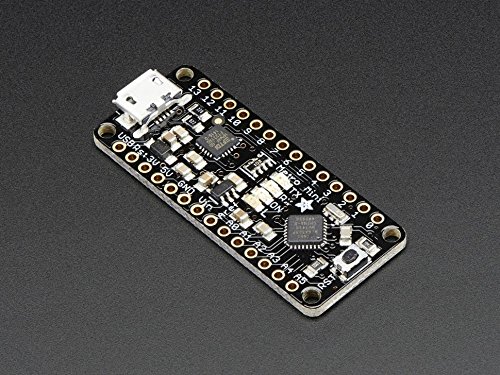
Marke
Adafruit
We sure love the ATmega328 here at Adafruit, and we use them a lot for our own projects. The processor has plenty of GPIO, Analog inputs, hardware UART SPI and I2C, timers and PWM galore - just enough for most simple projects. When we need to go small, we use a Pro Trinket 3V or 5V , but if you want to have USB-to-Serial built in, we reach for an Adafruit METRO Mini .
METRO Mini is the culmination of years of playing with AVRs: we wanted to make a tiny, breadboard-friendly development board that is easy to use and is hacker friendly. Metro Mini can be programmed with the Arduino IDE (select 'UNO' in the boards dropdown)
ATmega328 brains - This popular chip has 32KB of flash (1/2 K is reserved for the bootloader), 2KB of RAM, clocked at 16MHz Power the METRO Mini with 6-16V polarity protected on the Vin pin, or plug the micro USB connector to any 5V USB source. METRO has 20 GPIO pins , 6 of which are Analog in as well, and 2 of which are reserved for the USB-serial converter. There's also 6 PWMs available on 3 timers (1 x 16-bit, 2 x 8-bit). There's a hardware SPI port, hardware I2C port and hardware UART to USB. GPIO Logic level is 5V but by cutting and soldering closed a jumper on the bottom, you can easily convert it to 3.3V logic 5V onboard regulator with 150mA out, 3.3V 50mA available via FTDI chip USB to Serial converter , there's a genuine SiLabs CP2104 hardware USB to Serial converter that can be used by any computer to listen/send data to the METRO, and can also be used to launch and update code via the bootloader Four indicator LEDs , on the top of the PCB, for easy debugging. One green power LED, two RX/TX LEDs for the UART, and a red LED connected to pin PB5 / digital #13 Easy reprogramming , comes pre-loaded with the Optiboot bootloader Beautiful styling by PaintYourDragon and Bruce Yan, in Adafruit Black with gold plaAngebote werden geladen ...
...
* Alle Preise inkl. Mehrwertsteuer. Die Preise und Versandkosten können sich seit der letzten Aktualisierung verändert haben. Es ist technisch nicht möglich, die angegebenen Preise in Echtzeit zu aktualisieren. Es gilt der Preis zum Zeitpunkt des Kaufs auf der Website des Verkäufers. Als Teilnehmer der Partnerprogramme von Amazon und eBay verdient die metaspinner net GmbH an qualifizierten Verkäufen.