
Maexus PS4 Controller, Wireless Controller für Play Station 4
von Maexus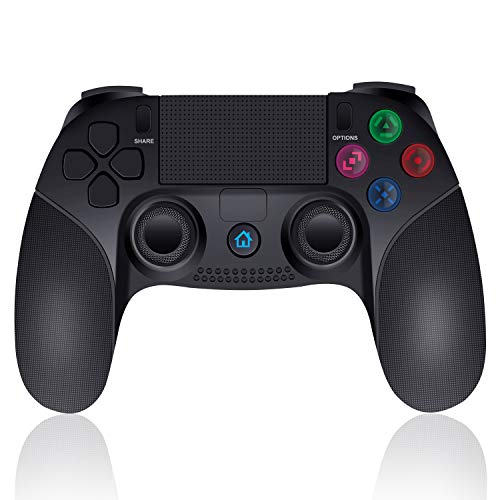
Marke
Maexus
1. Button function
1) HOME button: Short press to display main interface and switch applications; long press to end application, log off/power off console and display operable items.
2) Four functional buttons control character's actions in games.
3) D-Pad: Up, down, left and right, direction options.
4) Left and Right sticks: Control character's movement and entire screen direction.
5) In PS4: "SHARE" button is share, "OPRIONS" button is options. In PS3: "SHARE" button is "SELECT", "OPTIONS" button is "START"
NOTE: The button in different games maybe different function.
2. PS4 Connection
1) Connect the PS4 console with USB data cable
2) Press the HOME button until LED light flash, then only one light on, connection complete. Then unplug the data cable. the controller will automatically connect back.
3) 4 wireless controllers can be connnected at the same time. The color of LED light in different: Blue, Red, Green, Pink to indicate the players.
3. Connect to PS3 / PC:
1) Connect the controller to the USB port of the PS3 / PC via the USB cable.
2) PS3 / PC does not support six-axis sensing and vibration function. PS4 driver program is needed when connecting to PC
1) HOME button: Short press to display main interface and switch applications; long press to end application, log off/power off console and display operable items.
2) Four functional buttons control character's actions in games.
3) D-Pad: Up, down, left and right, direction options.
4) Left and Right sticks: Control character's movement and entire screen direction.
5) In PS4: "SHARE" button is share, "OPRIONS" button is options. In PS3: "SHARE" button is "SELECT", "OPTIONS" button is "START"
NOTE: The button in different games maybe different function.
2. PS4 Connection
1) Connect the PS4 console with USB data cable
2) Press the HOME button until LED light flash, then only one light on, connection complete. Then unplug the data cable. the controller will automatically connect back.
3) 4 wireless controllers can be connnected at the same time. The color of LED light in different: Blue, Red, Green, Pink to indicate the players.
3. Connect to PS3 / PC:
1) Connect the controller to the USB port of the PS3 / PC via the USB cable.
2) PS3 / PC does not support six-axis sensing and vibration function. PS4 driver program is needed when connecting to PC
Angebote werden geladen ...
...
* Alle Preise inkl. Mehrwertsteuer. Die Preise und Versandkosten können sich seit der letzten Aktualisierung verändert haben. Es ist technisch nicht möglich, die angegebenen Preise in Echtzeit zu aktualisieren. Es gilt der Preis zum Zeitpunkt des Kaufs auf der Website des Verkäufers. Als Teilnehmer der Partnerprogramme von Amazon und eBay verdient die metaspinner net GmbH an qualifizierten Verkäufen.